🚧 This generator is a work in progress. Features, designs, and documentation are actively being developed and may change.
📝 About
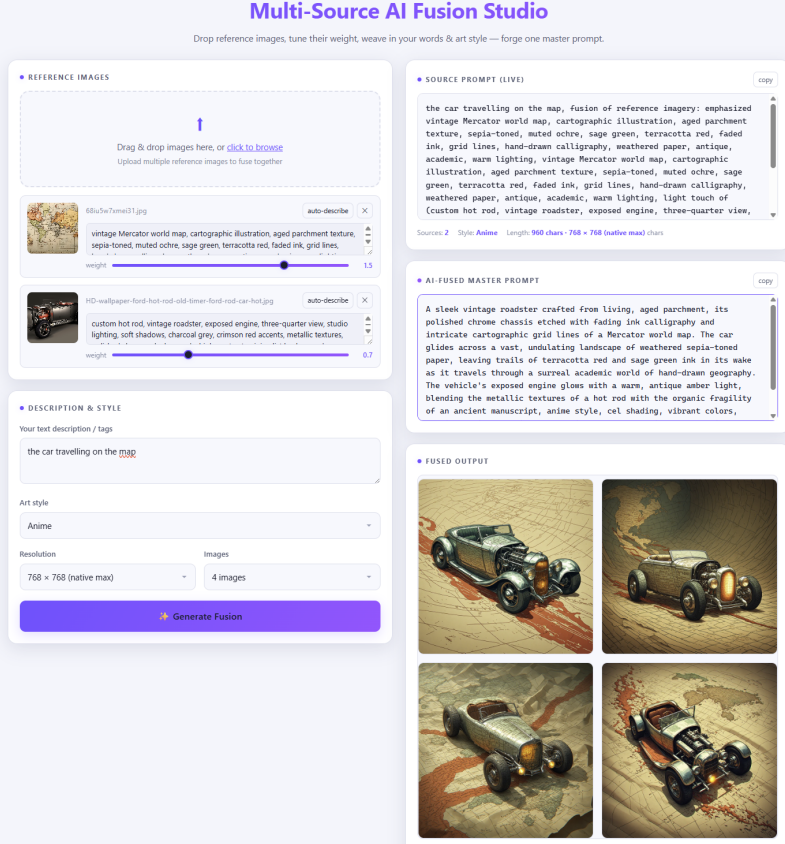
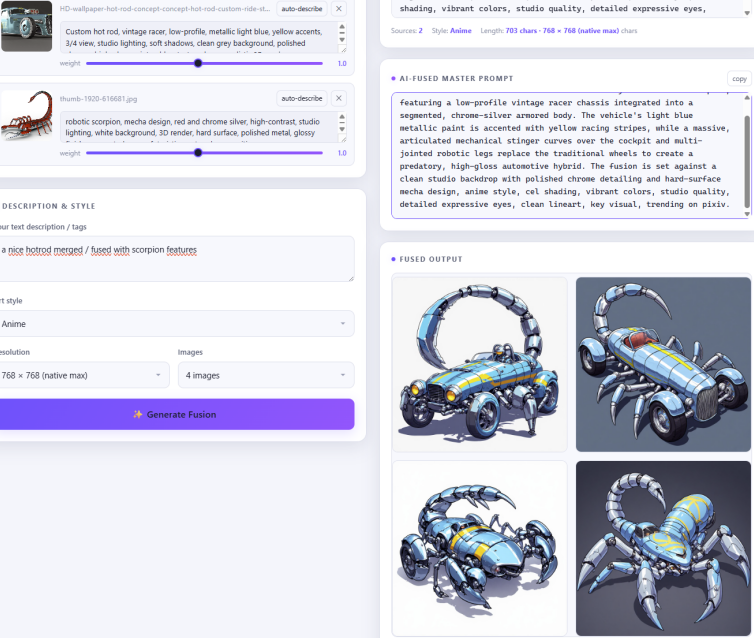
Upload several reference images, describe them, tune per-image weights, add free text and an art style, and let AI merge everything into one coherent fused artwork.
🔗 Two-Stage Pipeline
First, a language model semantically blends all sources into a single 'fused master prompt'; second, a text-to-image model renders 1–4 images at up to 4K resolution.
🎨 Auto-Describe
Vision AI analyzes each image automatically, generating descriptions that help the fusion process.
⚡ Client-Side Upscaling
Generate images at up to 4K resolution with client-side upscaling for crisp, detailed results.
✨ Key Features
- Multi-source image upload with per-image weight tuning
- 8 art styles and 7 resolution presets
- Live source-prompt preview
- Auto-describe feature using vision AI
- Client-side upscaling for high-resolution outputs
🎯 How to Use
Upload Images
Select multiple reference images from your device. Each image can be weighted to influence the fusion.
Configure Fusion
Add free text descriptions, choose an art style, and adjust per-image weights. Use auto-describe for AI-powered image analysis.
Generate & Download
Click generate to fuse all sources into a new artwork. Download the result or try different settings.
🖼️ Preview Gallery